November 23, 2026 - 5 min read
Make Sentinel your own: fork it and plug in your agent
Your own protocols, branding and pages: how a fork of Sentinel takes them on and still pulls every release, with a GNSS network as the extreme case.
Every monitoring tool has a settings screen, and every settings screen is someone else's guess about what you will need. DevOps engineers outgrow those guesses fast. The services they run speak protocols no vendor ships, their status pages go to people who expect their brand, and sometimes the page they really want is a map.
Sentinel takes a different route. It has almost no settings on purpose. When you need something it does not do, you fork it and make it yours, and the fork keeps pulling every release we ship. Honestly, I don't like customising things through settings anymore. It's far better to plug your agent into the repo and make it your own.
Who this is for
A DevOps engineer, or a whole platform team, with its own protocols, its own branding, its own idea of what a status page should show. Or one who likes Sentinel as it is but wants a few checks their own way: a caster that only answers with the right handshake, a catalogue that must list today's scenes, a data feed with its own format.
Last week's release made Sentinel something you can send to stakeholders. This post is about making it something only you could have built, without maintaining a separate product.
Why a fork, and why now
Forks used to be the expensive option. You copied a codebase, changed it in a hundred places, and every upstream release became a week of merging. Settings existed so you would not have to do that.
Two things changed. Coding agents can now read a repository, follow its rules and make a coherent change in an afternoon. And Sentinel was rebuilt so that a fork changes values and adds files instead of editing shared code. Together they make the fork the cheap option: you describe what you want, the agent writes it in the right place, and the next release still merges cleanly.
What a fork changes, and what it leaves alone
The rule is simple: add files, change values, and touch shared files as little as possible. Every line changed in an upstream file is a line that can conflict on the next pull. Sentinel gives a fork dedicated places for everything else.
- Your look. Colours, fonts and spacing live in one token file. Change the values and every page follows, in light and dark. The meaning of the states stays, so a reader of your page still knows that a square is an Outage.
- Your checks. A protocol of your own becomes a new member of the
ctxtoolkit that tests use, next toctx.httpandctx.s3. It gets the run's abort signal, so it stops when the run times out, and the run's logger; it cannot replace a built-in one. - Your routes, tools and jobs. One file,
apps/api/src/fork/extension.ts, declares what the fork adds: API routes (public ones under/status/), MCP tools and the paragraphs agents read about them, and background jobs. Upstream ships it empty and never edits it. - Your page.
apps/web/fork/status-lead.tsxrenders above the list of checks on the public status page. Upstream renders nothing there; a fork puts its map, banner or summary there. - Your data and your tables. Data files go in
apps/api/data/, which both images copy. Database migrations are numbered 900 to 999 in a fork, so upstream's never collide with yours.
// apps/api/src/fork/extension.ts in a fork
export const fork: ForkExtension = {
  routes: stationRoutes,                 // GET /status/stations/map, ...
  ctx: (run) => ({ ntrip: ntripFor(run) }), // ctx.ntrip in every test
  mcpTools: stationTools,                // what agents can do with stations
  mcpInstructions: ['This instance monitors ...'],
  start: startStationSync,
  stop: stopStationSync,
}
Plug in your agent
The repository is written for agents first. Its contributing guide is a brief an agent reads before it touches anything: the limits (it runs in 1 GB of RAM), the banned dependencies, how to write a check, where a fork puts things. The forking guide says which file holds what. An agent that is asked for "a check that our caster lists every station" knows where the protocol goes, where the test goes and what to tell other agents about it.
The same goes for operating the result. Whatever a fork adds through MCP shows up in the agent's view of the instance, next to everything upstream does. Your agent learns your protocol the moment it is deployed.
Staying current
A fork that cannot take updates is a dead end. Sentinel's release workflow only publishes from the main repository, so in a fork it just runs the tests, and the fork builds its own image from its own workflow. To update, merge the release you want. The example below ships a Sync upstream workflow that does it in one click: it merges the chosen release, runs the typecheck and the tests, and opens a pull request that says whether they passed. When there is a conflict, it is usually only in the dependency files.
The extreme case: a national GNSS network
The most extreme fork we know of monitors the real-time stations of RBMC, Brazil's national network of GNSS reference stations, through its public NTRIP caster. It adds a protocol, ctx.ntrip.sourcetable(), that reads the caster's list of live streams through a shared one-minute cache, so 157 station checks cost the caster one request a minute. It keeps exactly one check per station by reading the network's official station shapefile, adopting existing checks and pausing those of retired stations. And it leads its public status page with a map of the stations.
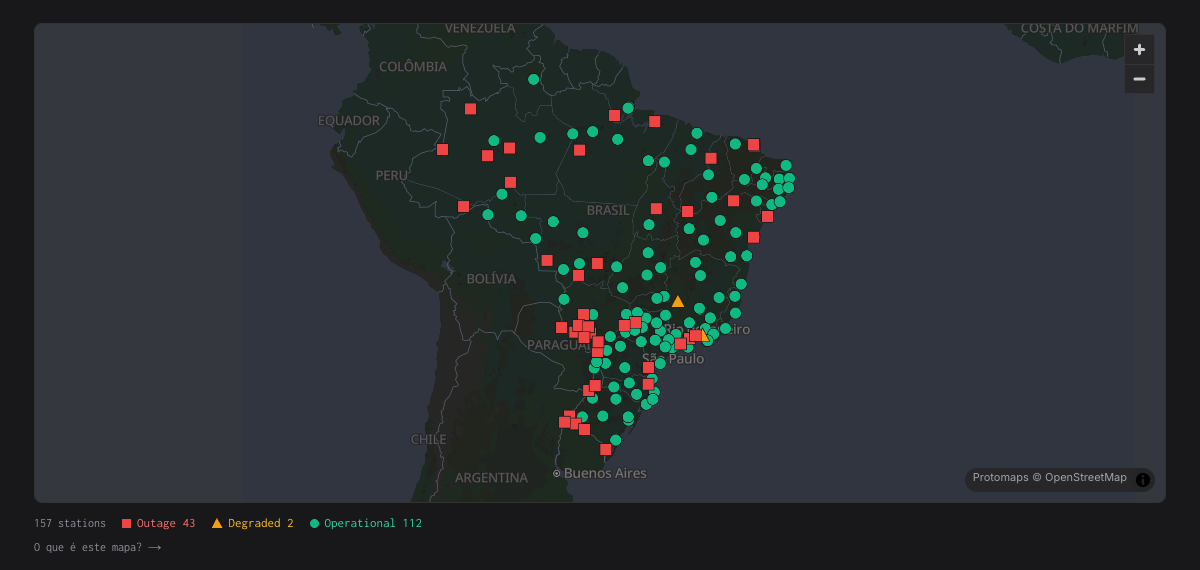
All of it lives in the fork's own files. When we released v1.32.0, the fork took it with a plain merge. What that map now shows surveyors is a story for next week.
Your monitor, your terms
Sentinel is open source under the AGPL v3 at github.com/territorial-dev/sentinel, and the station fork is public at github.com/paschendale/sentinel-rbmc as a working example. Fork it in the open, take a commercial licence to keep your fork closed, or ask us to build and run it with you.
The check engine is the same for everyone. What you check, how it looks and where it goes is yours.